

OEM and ODM Cooperation Options
Use an Existing Design
No need to make new mold. Only simple changes such as logo modification, silk print changing, package change, etc. Minimum order quantity: 500 Units


Make a New Design
Customized hardware or software development required, such as design, PCB, camera, app, etc. Minimum order quantity: 2000 Units

Download Product Catalog
View complete product line, get detailed technical specifications and solutions.
Buyer Questions & Answers
Buyer Questions & Answers
FAQ — Smart Home, Video Intercom, and Wi-Fi HaLow Products
📦 Orders and Logistics
Q: Are you a real manufacturer/factory?
✅ A: Yes, our company specializes in producing smart home and smart security products as a real manufacturer/factory.
Q: Are you able to provide OEM & ODM service?
✅ A: Yes, we provide OEM/ODM services and professional advice on product design, marketing, and business planning.
Q: How to place an order?
✅ A: You can order directly on our website, or contact us for offline purchase. After confirming your products, we will send you a proforma invoice or contract.
Q: How to delivery goods to me?
✅ A: We provide delivery by airplane, by train, and by ship. Delivery time is negotiable.
Q: What terms of payment do you offer?
✅ A: Payment terms are negotiable. Please contact our sales team for details.
🔧 Installation and Setup
Q: What kind of cable to use to connect the screen to the doorbell?
✅ A: You can use the cable from our store (better quality), or CAT5/CAT6. Please contact the seller for details on length and quality requirements.
Q: I purchased two screens, how do I install them?
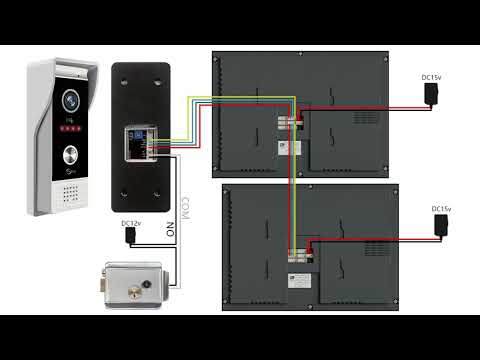
✅ A: Set the screen connected to the doorbell as the main screen (Digital ID: 1). Connect the next screen using the OUT port, connect the second screen to the IN port, and change the Digital ID to 2.
Q: How do I add my fingerprint and password?
✅ A: Please refer to this tutorial video: How to add fingerprint and password
Q: Does the video intercom device support connecting to sliding doors?
✅ A: Yes. Use the doorbell "COM" and "NO" two wires to connect to the sliding gate opener.
🔍 Troubleshooting
Q: The doorbell keeps ringing
✅ A: If the outdoor station does not have a card swipe function, set it to "don't support access card" mode. If it supports card swiping, set it to "support card" mode.
Q: The device works but the doorbell does not ring when pressed
✅ A: Set the screen to Home Screen Mode. If it is set to Message Mode, it will not ring.
Q: Image is blurry, black and white, or no image
✅ A: Set the settings to PAL 1080 and automatic. You can also adjust it on the back of the doorbell. Watch tutorial
Q: Device suddenly cannot connect to the Internet
✅ A: Power off and restart the device, or update the system.
Q: No voice from the doorbell (audio issue)
✅ A: Check the line settings to see if the audio cable is dropped, has poor contact, or has fallen off. You can also plug it into door2.
Q: Lock connected to doorbell won't open the door
✅ A: Check the wiring. If it doesn't unlock when connected to the 2PIN port, connect to the 3PIN port to power the lock. Also pay attention to distinguish between NO and NC.
Q: LED indicator on the screen does not light up
✅ A: If you bought 64218 or 64202, there is a separate 2PIN line. You cannot use the doorbell's 2PIN line because the positive and negative poles are opposite. The correct connection is the red line close to the LED indicator. If it still doesn't light up, it may be a motherboard issue.
Q: Device shows no permission to add device
✅ A: Click on the network on the screen, select the DEFAULT option, restart the screen, and try adding the device again. If it still fails, contact the seller.
⚙️ Features and Compatibility
Q: Does the smart central control panel support Bluetooth?
✅ A: Yes, but functions vary:
• Receive function (connect to mobile phone, not Bluetooth speaker): Q7
• Transmit function (connect to Bluetooth speaker, not mobile phone): 10 inch, 12 inch
• Transmitter & receiver: 4 inch, 6 inch (F6), 6.8 inch, 7 inch (F7), 8 inch (F8)
Q: What is the default password to open the door using Tuya?
✅ A: The initial password is 888888.
Q: Can I use a DC12V battery pack to power the video intercom?
✅ A: No. The video intercom doorbell needs continuous power supply and video transmission requires a larger current, so it cannot be powered by a battery pack.
Q: The distance between doorbell and screen is far, image is blurry
✅ A: If the distance exceeds 30 meters, the doorbell needs to be powered separately.
🌐 Connectivity and Networking
Q: Can connect to 5G wifi?
✅ A: No, only 2.4G wifi can be used.
Q: I cannot activate the wifi on the monitor
✅ A: The wifi of the screen is not successfully connected. Please contact our technical support via WhatsApp: +8617336198736. It is best to shoot a video in advance so we can quickly provide the solution.
Q: How to connect to Tuya?
✅ A: Please refer to our video tutorials:
• YouTube: @anjielosmart
• TikTok: Search "Anjielo Smart"
• Email: yuyunzhu@anjielo.com | sales@anjielo.com
• WhatsApp: +8617336198736
💬 Need more help?
If the Q&A above does not resolve your issue, please contact our technical support team:
 Luna
Luna
 Jorrine
 George
 Ashling
 Jason
Jason
 Jack
Jack