


Anjielo 2‑Wire Bus Video Intercom System |7‑Inch /10‑Inch Touch‑Screen for 1‑2‑3‑4 Households,IP65 1080P Tuya Wired Door Phone
Anjielo 2‑Wire Bus Video Intercom System |7‑Inch /10‑Inch Touch‑Screen for 1‑2‑3‑4 Households,IP65 1080P Tuya Wired Door Phone
Couldn't load pickup availability
Anjielo 2‑Wire Bus Video Intercom System |7‑Inch /10‑Inch Touch‑Screen for 1‑2‑3‑4 Households,IP65 1080P Tuya Wired Door Phone
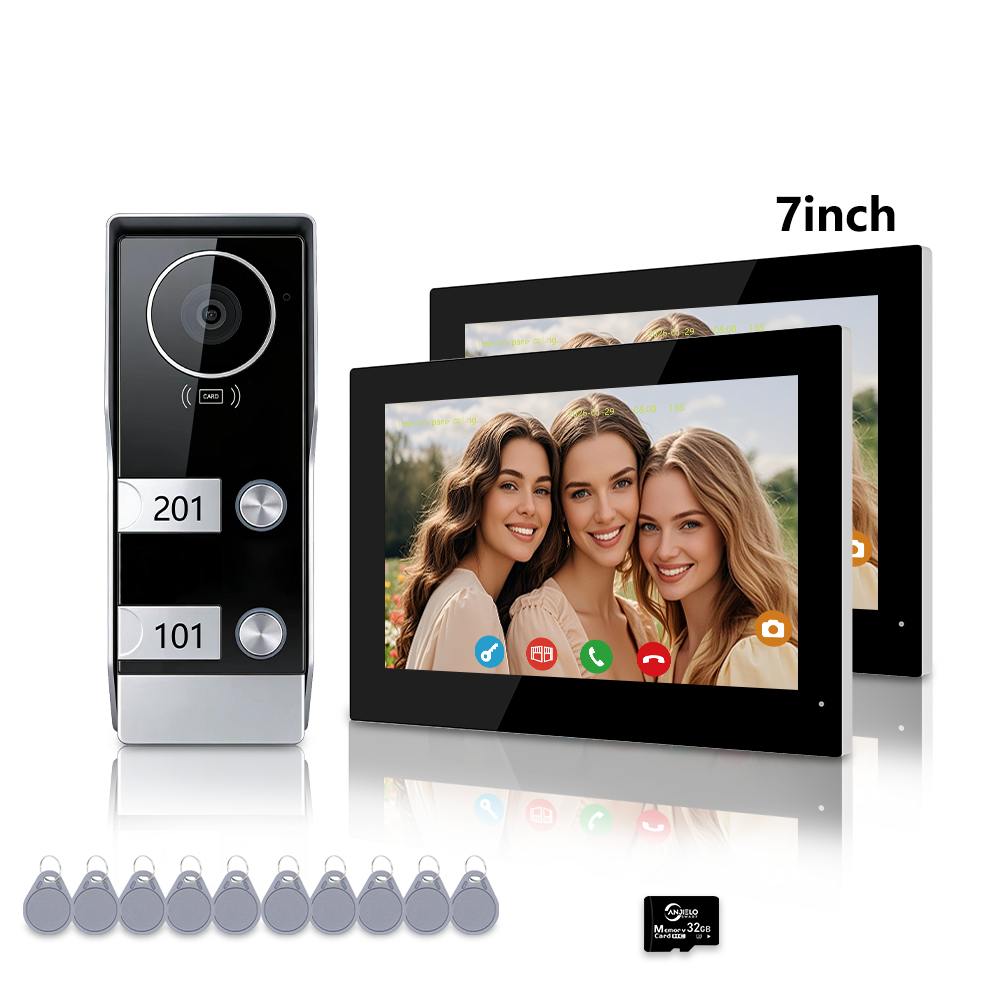
Anjielo 2‑wire bus wired video intercom is expandable multi‑household door entry solution, supporting 1 / 2 / 3 / 4 independent households. Two monitor size choices: 7‑inch or 10‑inch TFT‑LCD touch‑screen. IP65 weather‑resistant 1080P outdoor door station with wide working temperature ‑40℃ ~ +50℃, PIR human motion‑detection, multi‑mode unlock, max 64GB Micro SD‑card local recording. Work with Tuya & Smart Life App for remote monitoring and remote unlock. Perfect for apartment, duplex home, townhouse, gated community, old‑building renovation, for homeowners, property managers and professional installers.
Important Notice: This is 2‑wire‑bus wired doorphone, NOT fully‑wireless battery‑powered doorbell. Indoor monitor only supports 2.4GHz WiFi ONLY; 5GHz WiFi is NOT compatible. Continuous stable power supply required, cannot run by DC battery pack. Micro SD‑card sold separately for snapshot and video recording. Factory default password: 888888.

Monitor Size 7-inch TFT-LCD Touch Screen
Monitor Resolution 1024×600
Outdoor Camera Resolution 1080P HD
Waterproof Rating IP65
Connection Type 2-Wire Wired (Easy Setup)
App Compatibility Tuya Smart / Smart Life
Power Supply DC 24V
Supported Households 2-4 Families (Independent Systems)
Recording Function Video/Photo (Motion/Call Trigger)

2‑Wire Bus Simple Wiring & Master‑Secondary Expandable Setup
Adopt stable 2‑wire bus transmission between outdoor door station and indoor monitors. It can reuse existing two‑core wall wiring for renovation projects and reduce installation cost. Support master‑secondary indoor monitor configuration: set the monitor directly connected to outdoor station as master unit ID=1; extended secondary indoor monitor set ID=2. Suitable for expand 1‑2‑3‑4 household independent calling system.
 ✅ Tuya/Smart Life App Remote Control
Connect to the Tuya Smart or Smart Life app via WiFi for full remote access: view live footage, two-way talk, unlock the door, and receive real-time motion alerts—anytime, anywhere (on iOS/Android devices).

✅ Smart Human Body Detection & Recording
Automatically captures human motion and triggers instant app alerts. Supports automatic video/photo recording during motion detection or calls (up to 30 minutes of continuous monitoring). Save footage to a Micro SD card (max 64GB, not included) for evidence storage.

IP65 Outdoor Door Station,1080P & Wide Temperature Adaptation
Outdoor door station with IP65 waterproof and dust‑proof rating, housing made of durable ABS and aluminum alloy. Working temperature ranges from ‑40℃ to +50℃, stable performance under cold winter, hot summer, rain and snow weather. Built‑in 1080P HD camera and IR infrared night‑vision, provide clear image day and night. Independent call button for each household. Relay output supports electric lock, magnetic lock and sliding‑gate opener. Independent power‑supply is highly recommended for external lock to avoid hardware damage caused by wrong wiring.

✅ 7-inch HD Touch Screen & Clear Visuals
Equipped with a 7-inch high-resolution touch screen monitor (1024×600 resolution) and 1080P outdoor camera, delivering sharp, clear video day and night. The screen also functions as a digital clock, maximizing multi-scene usability.

Multi‑Unlock Modes & Two‑Way Audio‑Video Intercom
- RFID IC‑Card Unlock: Swipe IC‑card on outdoor panel for family and tenants quick access
- Touch‑Screen Unlock: Tap unlock icon on indoor touch‑screen
- Tuya & Smart Life App Remote Unlock: Real‑time remote unlock and live‑view monitoring on iOS & Android phone
When visitor presses corresponding household call‑button, matched indoor monitor will ring. Real‑time hands‑free two‑way audio‑video conversation between indoor monitor and outdoor door station. Max continuous monitoring time up to 30 minutes.

✅ Two-Way Video Intercom & Multi-Unlock
Press the outdoor button to initiate hands-free two-way talk with visitors/delivery personnel. Unlock the door via the indoor monitor, smartphone app, or RFID card/password for flexible access control.

PIR Motion‑Detection & SD‑Card Local Recording
Smart PIR human motion‑detection function will trigger mobile push alert once human activity detected near entrance. Auto capture snapshot and video when visitor press doorbell button. Support max 64GB Micro SD‑card for loop recording, visitor logs and motion‑triggered footage save locally on indoor monitor. Playback photos and video directly on touch‑screen monitor. No mandatory cloud‑subscription needed for local storage. Micro SD‑card sold separately.


7‑Inch & 10‑Inch TFT‑LCD Touch‑Screen Indoor Monitor
Select compact 7‑inch or large‑size 10‑inch TFT‑LCD touch‑screen indoor monitor with 1024×600 high‑resolution. Responsive touch‑UI for local unlock, parameter adjustment and recorded file playback. Screen can display digital clock in standby status. Multiple indoor monitors support independent ring and inter‑call communication for multi‑household usage.


Application Scenarios
This expandable 2‑wire bus intercom system fits private multi‑family apartment building, duplex home, townhouse, gated community, rental property and old‑building renovation project. Suitable for home residents, property managers and professional security installers.
Frequently Asked Questions
Q: Is this battery‑powered fully‑wireless wifi doorbell?
A: No. Outdoor door station and indoor monitor adopt 2‑wire‑bus wired connection. Indoor monitor only supports 2.4GHz WiFi for Tuya Smart Life remote functions; 5GHz WiFi network is incompatible. This device cannot work with DC battery pack and requires continuous stable power supply.
Q: How many households can this intercom support?
A: This 2‑wire bus intercom supports 1,2,3 or 4 independent households with dedicated call‑buttons on outdoor door station.
Q: What is master‑secondary monitor setting?
A: Set monitor directly connected to outdoor door station as master unit ID=1, additional extended indoor monitor set as secondary unit ID=2 for multi‑household expansion.
Q: What maximum Micro SD‑card capacity does it support?
A: Max support 64GB Micro SD‑card for snapshot and loop‑video recording, memory card sold separately.
Q: What is factory default system password?
A: Factory default password is 888888, please modify password after first‑time setup for security purpose.
Q: What cable should I use for long‑distance installation?
A: Recommended 2‑core bus cable, CAT5 or CAT6. When wiring distance exceeds 30 meters, please adopt separate power supply for outdoor door station.
Buyer Questions & Answers
Buyer Questions & Answers
Buyer Questions & Answers
FAQ — Smart Home, Video Intercom, and Wi-Fi HaLow Products
📦 Orders and Logistics
Q: Are you a real manufacturer/factory?
✅ A: Yes, our company specializes in producing smart home and smart security products as a real manufacturer/factory.
Q: Are you able to provide OEM & ODM service?
✅ A: Yes, we provide OEM/ODM services and professional advice on product design, marketing, and business planning.
Q: How to place an order?
✅ A: You can order directly on our website, or contact us for offline purchase. After confirming your products, we will send you a proforma invoice or contract.
Q: How to delivery goods to me?
✅ A: We provide delivery by airplane, by train, and by ship. Delivery time is negotiable.
Q: What terms of payment do you offer?
✅ A: Payment terms are negotiable. Please contact our sales team for details.
🔧 Installation and Setup
Q: What kind of cable to use to connect the screen to the doorbell?
✅ A: You can use the cable from our store (better quality), or CAT5/CAT6. Please contact the seller for details on length and quality requirements.
Q: I purchased two screens, how do I install them?
✅ A: Set the screen connected to the doorbell as the main screen (Digital ID: 1). Connect the next screen using the OUT port, connect the second screen to the IN port, and change the Digital ID to 2.
Q: How do I add my fingerprint and password?
✅ A: Please refer to this tutorial video: How to add fingerprint and password
Q: Does the video intercom device support connecting to sliding doors?
✅ A: Yes. Use the doorbell "COM" and "NO" two wires to connect to the sliding gate opener.
🔍 Troubleshooting
Q: The doorbell keeps ringing
✅ A: If the outdoor station does not have a card swipe function, set it to "don't support access card" mode. If it supports card swiping, set it to "support card" mode.
Q: The device works but the doorbell does not ring when pressed
✅ A: Set the screen to Home Screen Mode. If it is set to Message Mode, it will not ring.
Q: Image is blurry, black and white, or no image
✅ A: Set the settings to PAL 1080 and automatic. You can also adjust it on the back of the doorbell. Watch tutorial
Q: Device suddenly cannot connect to the Internet
✅ A: Power off and restart the device, or update the system.
Q: No voice from the doorbell (audio issue)
✅ A: Check the line settings to see if the audio cable is dropped, has poor contact, or has fallen off. You can also plug it into door2.
Q: Lock connected to doorbell won't open the door
✅ A: Check the wiring. If it doesn't unlock when connected to the 2PIN port, connect to the 3PIN port to power the lock. Also pay attention to distinguish between NO and NC.
Q: LED indicator on the screen does not light up
✅ A: If you bought 64218 or 64202, there is a separate 2PIN line. You cannot use the doorbell's 2PIN line because the positive and negative poles are opposite. The correct connection is the red line close to the LED indicator. If it still doesn't light up, it may be a motherboard issue.
Q: Device shows no permission to add device
✅ A: Click on the network on the screen, select the DEFAULT option, restart the screen, and try adding the device again. If it still fails, contact the seller.
⚙️ Features and Compatibility
Q: Does the smart central control panel support Bluetooth?
✅ A: Yes, but functions vary:
• Receive function (connect to mobile phone, not Bluetooth speaker): Q7
• Transmit function (connect to Bluetooth speaker, not mobile phone): 10 inch, 12 inch
• Transmitter & receiver: 4 inch, 6 inch (F6), 6.8 inch, 7 inch (F7), 8 inch (F8)
Q: What is the default password to open the door using Tuya?
✅ A: The initial password is 888888.
Q: Can I use a DC12V battery pack to power the video intercom?
✅ A: No. The video intercom doorbell needs continuous power supply and video transmission requires a larger current, so it cannot be powered by a battery pack.
Q: The distance between doorbell and screen is far, image is blurry
✅ A: If the distance exceeds 30 meters, the doorbell needs to be powered separately.
🌐 Connectivity and Networking
Q: Can connect to 5G wifi?
✅ A: No, only 2.4G wifi can be used.
Q: I cannot activate the wifi on the monitor
✅ A: The wifi of the screen is not successfully connected. Please contact our technical support via WhatsApp: +8617336198736. It is best to shoot a video in advance so we can quickly provide the solution.
Q: How to connect to Tuya?
✅ A: Please refer to our video tutorials:
• YouTube: @anjielosmart
• TikTok: Search "Anjielo Smart"
• Email: yuyunzhu@anjielo.com | sales@anjielo.com
• WhatsApp: +8617336198736
💬 Need more help?
If the Q&A above does not resolve your issue, please contact our technical support team:
Buy Butten
Buy Butten
The Great Clearance Sale
Up to 70% Off – Everything Must Go!
It's time to make room for new arrivals, which means massive savings for you. From now through November 30, 2026, we're slashing prices on hundreds of items – with discounts up to 70% off original retail prices. Whether you're stocking up on essentials or treating yourself to that wishlist item, now is the moment to act. These are final markdowns, and once they're gone, they're gone for good. No restocks. No rain checks. Just unbeatable deals while supplies last.
*Offer Details: Discounts apply to marked clearance items only. All sales final. Quantities are limited and subject to availability. No price adjustments on prior purchases.
Sale ends November 30, 2026 at 11:59 PM (or while supplies last). Not combinable with other promotions.
Shipping & Returns
Shipping & Returns
🛡️ Buyer Protection and Warranty Policy
ANJIELO SMART — Your Purchase Protection and After-Sales Service Policy
ANJIELO SMART Buyer Protection and Warranty Policy applies to all purchases from Anjielo.com. It describes your rights to return, refund, and warranty service, as well as your responsibilities for proper installation and use.
For customers in the European Union (EU) or United States (US), specific provisions may apply as noted below. Nothing in this policy limits any mandatory consumer rights under the laws of your country of residence.
📑 Table of Contents / Navigation
💰 Section 1 – Money-Back Guarantee (30-Day Quality Guarantee)
We want you to be completely satisfied. If the item you receive is not as described, or if you simply change your mind, you may request a return under the terms below.
1.1 Eligibility
- You must contact us within 30 days of receiving your product.
- The product must be unused, unmodified, and in original condition – including original packaging, tags, and all accessories.
- Products that show signs of improper installation, wiring damage, or physical abuse are not eligible for money-back return.
1.2 How to Return for a Refund
- Email sales@anjielo.com or WhatsApp +8617336198736 with your order number and reason for return.
- We will provide a return authorization and local return address (if available in your country).
- Ship the product back within 14 days after receiving return instructions.
1.3 Refund Amount
- Refund = product purchase price (excluding original shipping fees).
- Free Return service (where offered) applies only if the product is in new, resalable condition.
- If an inspection reveals that the damage was caused by you (including incorrect wiring) rather than a product defect, we will deduct the repair costs or refuse the refund.
1.4 EU 14-Day Right of Withdrawal
If you are a consumer in the EU, you have a 14-day cooling-off period to withdraw from the purchase without giving any reason. The right of withdrawal ends 14 days after you (or a person you designate) take physical possession of the goods. You must bear the direct cost of returning the goods, unless we offered free return. This statutory right is not affected by our 30-day guarantee, but the product must not show damage from misuse or improper installation.
🔧 Section 2 – Limited Warranty (18 Months)
We warrant that the product is free from defects in materials and workmanship under normal, intended home use for the following periods from the original purchase date:
| Use Type | Warranty Period |
|---|---|
| Normal household use | 18 months |
| Commercial / business use | 12 months |
2.1 What IS Covered
- Hardware failures due to manufacturing defects.
- Functional defects in pre-installed software.
- Battery capacity degradation below 70% of rated capacity under normal use.
2.2 What IS NOT Covered – Important Exclusions
⚠️ Installation & Wiring Errors (most common cause of "no power / not working")
- Incorrect, reversed, or loose electrical wiring.
- Use of incompatible power supply or voltage mismatch.
- Connection of any third-party device (e.g., electric locks) without a separate, dedicated power supply.
- Failure to follow the written installation instructions.
- Short circuits, electrical surges, or overheating caused by the above.
❌ Physical Damage & Misuse
- Drops, impacts, liquid immersion, or corrosive environment.
- Scratches, dents, or normal wear and tear.
- Unauthorized modification, disassembly, or repair.
2.3 Warranty Claim Process
To make a warranty claim, contact sales@anjielo.com or WhatsApp +8617336198736 with your order number, proof of purchase, and a detailed description of the issue.
2.4 Resolution Options for Valid Claims
If we find a covered defect, we will, at our sole option: Repair the product, or Replace it with a refurbished or new equivalent model, or Refund the original purchase price (excluding shipping).
📦 Section 3 – Free Return Service (Where Offered)
We offer Free Local Return in selected countries (including US, CA, AU, UK, FR, DE, ES, IT, NL, PL, IL, etc.). This service allows you to return an item to a local warehouse without paying return shipping,please contact our customer service team for details.
3.1 Conditions for Free Return
- The product must be unused, in original condition with all packaging.
- You must request the return within 15 days of receiving the product.
- Free Return does NOT apply to: issues unrelated to product defects, or products damaged by improper installation, wiring errors, or where the serial number or seal is broken.
3.2 How to Use Free Return
- Contact us to obtain a return code/label.
- Drop off the package at a designated local service point or schedule a pickup.
- Once the local warehouse confirms receipt, we process your refund within 5 business days.
🇪🇺 Section 4 – Special Provisions for the European Union (EU)
4.1 Legal Conformity Warranty (2 Years)
You have a 2-year legal guarantee that the goods conform to the contract at the time of delivery. However, you must prove that the lack of conformity existed at the time of delivery. If the product is damaged after delivery due to incorrect installation, that is not a lack of conformity at delivery.
4.2 14-Day Right of Withdrawal
You have 14 days to cancel the purchase. You lose this right if you have installed, mounted, or modified the product beyond what is necessary to inspect it. Simply opening the package is fine; drilling holes, connecting wires, or attaching the doorbell to a wall constitutes "using" the product and may limit your withdrawal rights.
🇺🇸 Section 5 – Special Provisions for the United States (US)
For consumers in the US, this warranty is a limited warranty and is governed by the Magnuson-Moss Warranty Act and applicable state laws.
5.1 Implied Warranties
Any implied warranties (e.g., merchantability, fitness for a particular purpose) are limited to the duration of this express warranty (18 months). Some states do not allow limitations on how long an implied warranty lasts, so this may not apply to you.
5.2 Limitation of Consequential Damages
We are not responsible for any incidental or consequential damages (such as loss of time, inconvenience, damage to your home wiring, door, or other property). Some states do not allow the exclusion of consequential damages, so this may not apply to you.
5.4 Installation Warning – US Emphasis
⚠️ In the US, improper installation is the #1 cause of doorbell failures. We strongly recommend installation by a licensed electrician. If you connect any electric lock or accessory without a separate power supply, you assume all risk of damage. This limited warranty does not cover such damage.
📋 Section 6 – General Provisions (All Customers)
6.1 How to Contact Us
Email: sales@anjielo.com
WhatsApp: +8617336198736
Please include your order number and photos/videos of the issue when possible.
6.2 Governing Law & Dispute Resolution
For EU customers: Your mandatory consumer rights are governed by the law of your country of residence.
For US customers: This warranty is governed by the laws of the state of the seller's registered address. Any dispute shall first be attempted to be resolved through binding arbitration upon either party's request.
6.3 Changes to This Policy
We may update this policy from time to time. The version applicable to your purchase is the one in effect on the date of your order.
❓ If you have any questions about this policy, please contact us:
📧 sales@anjielo.com | 📞 WhatsApp: +8617336198736
Download
Download

Download Center & OEM/ODM Cooperation
Access our complete product catalog, explore OEM/ODM cooperation options, and get in touch with our team for customized smart hardware solutions.
OEM and ODM Cooperation Options
Use an Existing Design
No need to make a new mold. Only simple changes such as logo modification, silk print changing, package change, etc.
Minimum Order Quantity: 500 Units
Make a New Design
Customized hardware or software development required, such as design, PCB, camera, app, etc.
Minimum Order Quantity: 2000 Units

Download Product Catalog
View the complete product line, get detailed technical specifications and solutions.
👥 Contact Our Team
💡 If you are interested in our products and would like to know more details, please leave a message, and we will get back to you as soon as possible!
🌐 Official Website: www.anjielotech.com
▶️ YouTube: Subscribe to our channel
Contact Us
Contact Us
ANJIELO SMART strives to provide the best services with every contact!

We operate in smart home industry built on trust. This is achieved through professional communication and experienced supports. Here, you can get
👥 Our Team
 Luna
Luna


 Jorrine
 George
 Ashling
- ✅ Affordable one-stop solutions
- 📞 24/7 before-sales and after-sales services: 86-0760-86657689
- 💬 Comprehensive technical support WhatsApp: +8615913473606 / +8617336198736
- 📺 YouTube: www.youtube.com/@anjielosmart | TikTok: Search "Anjielo Smart" on TikTok
- ✉️ Email: sales@anjielo.com; sales1@anjielo.com; sales5@anjielo.com
- The website is jointly operated by Zhongshan Anjielo Smart Technology Co., Ltd and BLUE STAR TRADING LIMITED Company
- 🏢 Company name: Zhongshan Anjielo Smart Technology Co., Ltd
- 📍 Address: Room 803, Building 8, No. 1, Shatan South Road, Tanzhou Town, Zhongshan City, Guangdong Province, China
- 🇷🇺 Полное наименование (рус): ООО «АНЖИЕЛО СМАРТ»
- 📍 Юридический адрес: 125195, город Москва, Беломорская ул, д. 18а, помещ. 6/1, Россия
- 🏢 Company name: TELOS TRADING LIMITED
- 📍 Company address: 134 Corfield St, London, England, E2 0DS
- 🏢 Company name: ANJIELO SMART HOME SDN. BHD.
- 📍 Company address: C1-0507 JALAN INDAH 15 TAMAN BUKIT INDAH 79100 ISKANDAR PUTERI JOHOR MALAYSIA
📍 Our Location
Google Maps (China)
Yandex Maps (Russia)


The Great Clearance Sale
Up to 70% Off – Everything Must Go!
It's time to make room for new arrivals, which means massive savings for you. From now through November 30, 2026, we're slashing prices on hundreds of items – with discounts up to 70% off original retail prices. Whether you're stocking up on essentials or treating yourself to that wishlist item, now is the moment to act. These are final markdowns, and once they're gone, they're gone for good. No restocks. No rain checks. Just unbeatable deals while supplies last.
👥 Contact our team
 Luna
Luna

 Jorrine
 George
 Ashling
 Jason
Jason
 Jack
Jack
💡 If you are interested in our products and would like to know more details, please leave a message, and we will get back to you as soon as possible!
 www.anjielotech.com
 Catalog Download
 YouTube
 whatsapp
 WeChat